Every Call.
Every Customer.
Automatically.
Your AI agent listens to every call, updates Jobber from what you say, sends follow-ups, and books assessments — Every call. Every time.

Imagine This
Imagine you had someone listening to your calls all day and automatically updating Jobber from what you say.
A customer calls. KodaAI creates the client and adds a note with what the customer needs and what information they provided. You get a text message with the details, and KodaAI adds a task to your schedule to call them back.
You call them back. During the call you ask for their address and tell them you'll send a text with a link to book the assessment. The client gets the text and can see the dates and times when you'll be near their address — less driving for you.
When you hang up, everything you just said is documented in Jobber. The booking link is sent to the customer so they can choose what's convenient for them. And remember that task to call them back? It's automatically completed — without you doing anything.
All of this is handled by your virtual agent, KodaAI — from your conversations with clients.
Connects to your phone system & CRM
Dialpad
Cloud business phone system. Voicemails, answered & missed calls.
Zoom Phone
Enterprise phone by Zoom. Recordings & voicemails with transcripts.
Jobber
Field service CRM. Clients, work requests & notes created automatically.
What Your Agent Does
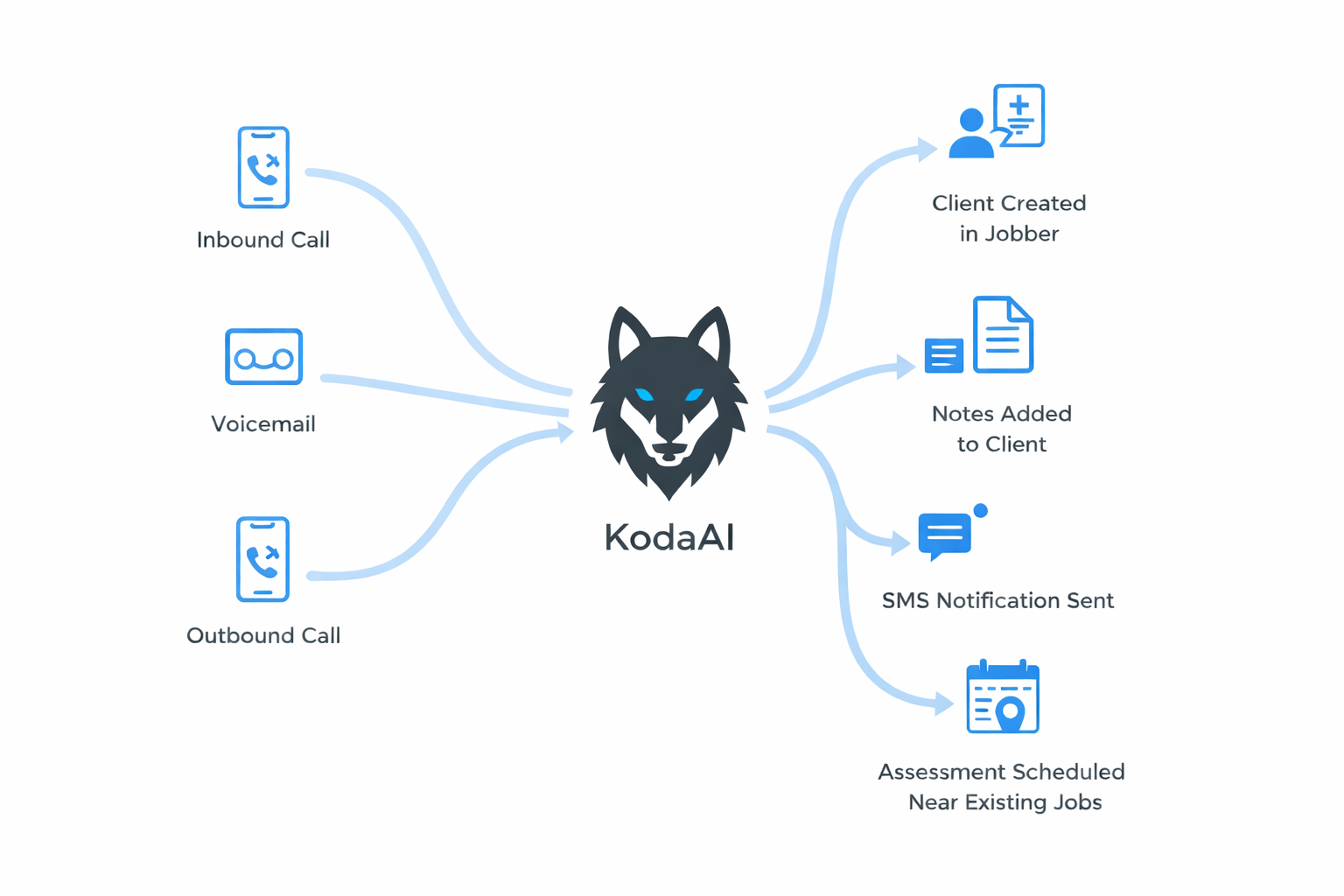
Every call — inbound, voicemail, or outbound — KodaAI handles it from start to finish.

1
A Call Happens
Koda processes every call on your Dialpad or Zoom Phone line — inbound calls, voicemails, and outbound calls. Answered or missed, it doesn't matter.
Inbound Call
Voicemail Left
Outbound Call
2
AI Extracts Details
Koda's AI analyzes the transcript and pulls out every detail it can find — name, phone, address, email, and service type. Names are spell-checked against local area data, and addresses are validated with the US Census geocoder.
Name
Robert Thompson
Address
456 Oak Street, Greenville, SC
Service
Leaky Faucet Repair
Email
robert.thompson@email.com
Lead Source
Google
Appointment
Mon Mar 16 at 2:00 PM
3
Jobber Updated Automatically
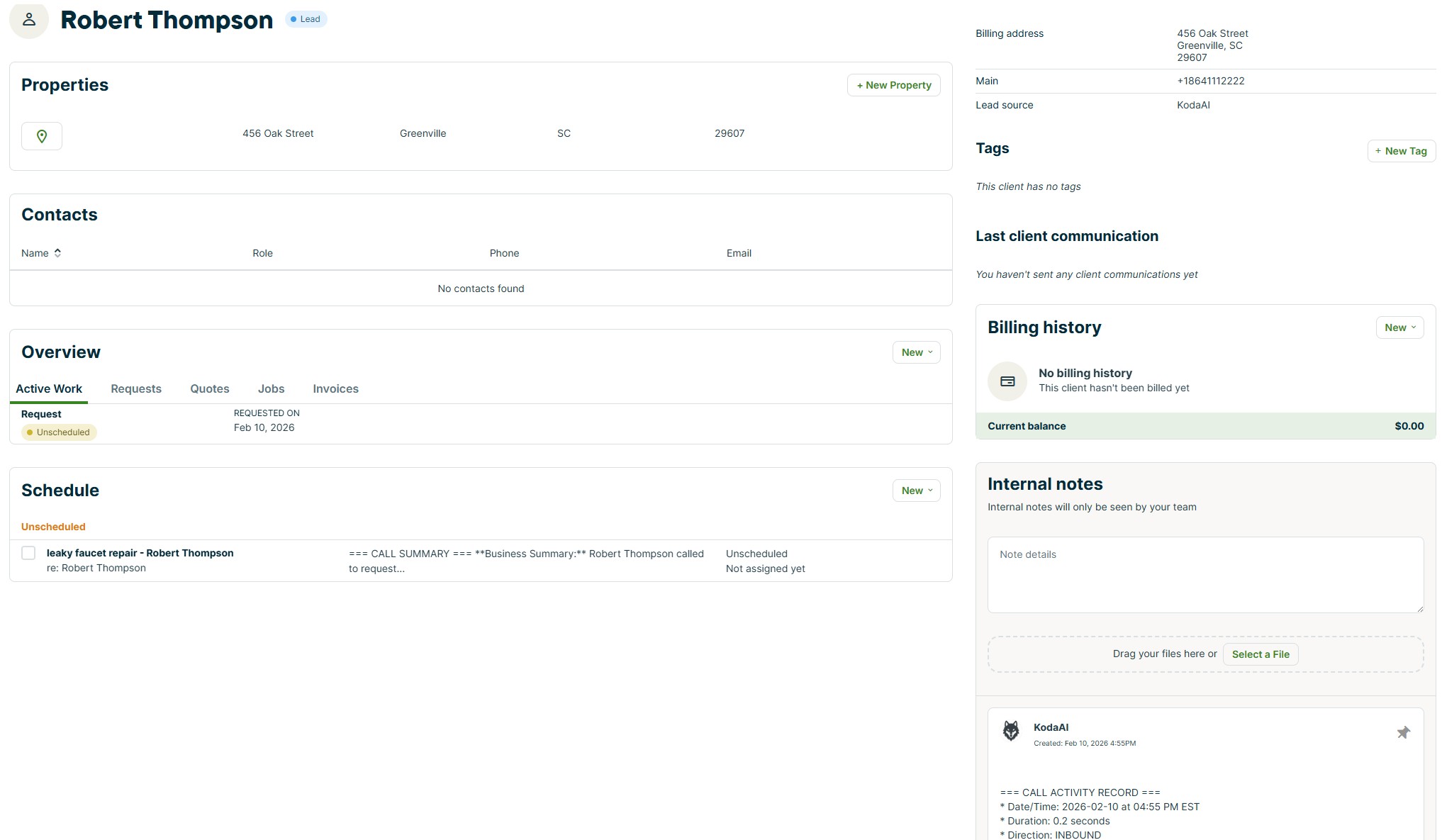
A new client and work request appear in Jobber. Everything from the call — documented automatically.
New Client & Work Request
Name, phone, email, address, service details — all created with lead source tracking
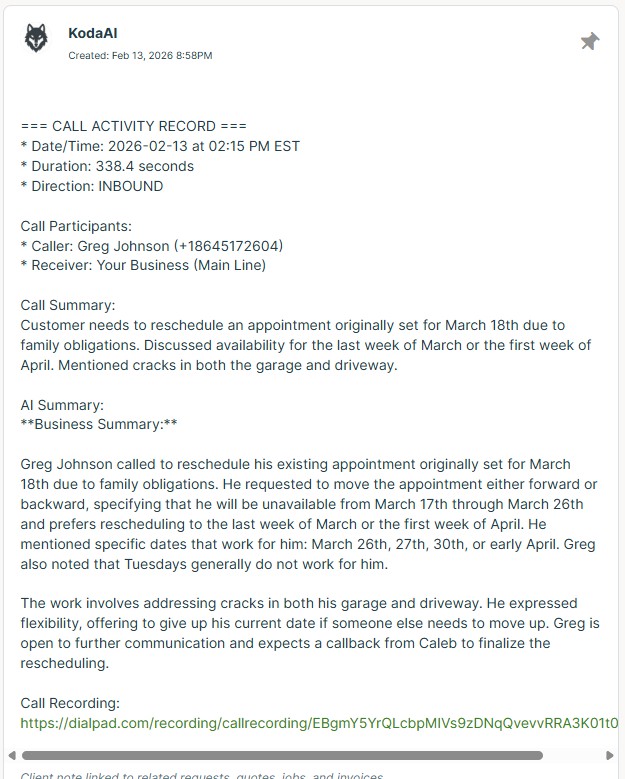
Call Notes with AI Summary
Complete call record with extracted data, participants, duration, and recording link
Assessment Auto-Scheduled
If you discussed a date and time during the call, the assessment is created on your Jobber calendar automatically
Text with Call Details
You get a text with the caller info and a link to view the full call details
Customer Self-Booking Link
If no assessment time was set, you can send the customer a booking link where they choose a time that works — near your existing jobs
4
Schedule Assessments — Two Ways
Koda gives you flexible options for handling assessments. Choose what fits your workflow.
Auto-Schedule from Call
NEW
When a date and time are agreed upon during the call — like “Monday the 16th at 2 PM” — Koda extracts it and creates a scheduled assessment in Jobber automatically.
Booking Link Flow
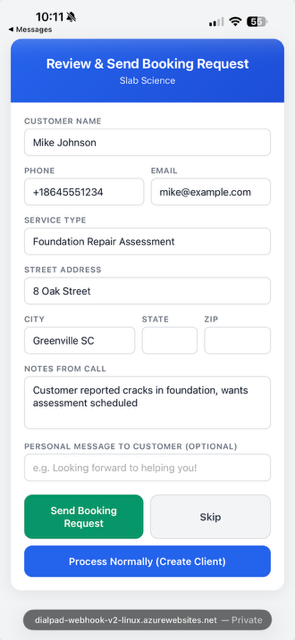
When no date was set, Koda sends you an approval text. You approve, the customer gets a booking link with smart-optimized time slots, and a follow-up task lands on your Jobber schedule. When the customer books, the task is automatically removed.
Unscheduled Request
Creates a work request with all the call details. Schedule it manually when ready.
Approve & Send
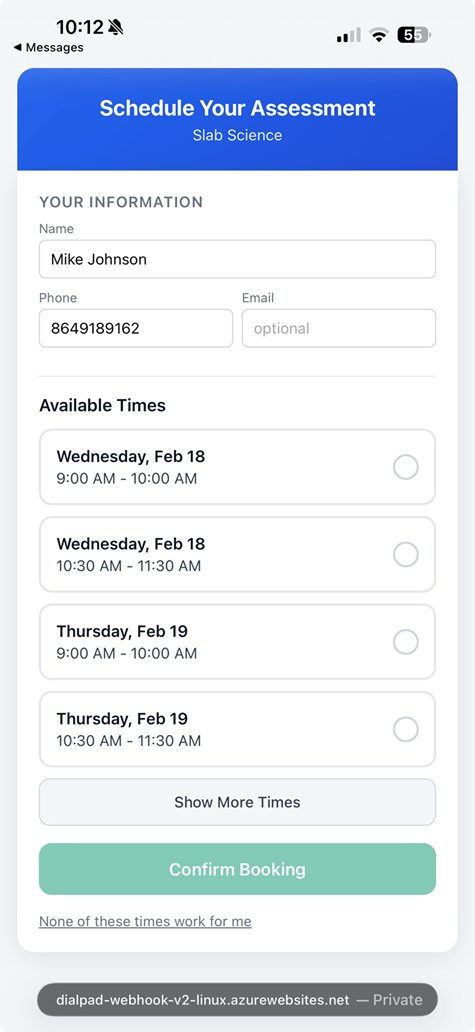
Customer Books
Smart Scheduling
AI That Knows Where Your Team Already Is
Koda doesn't just offer random time slots. It looks at your existing Jobber calendar, calculates real drive times between job sites, and prioritizes times that keep your techs in the same area — so they spend more time working and less time driving.
Real Drive Time Calculation
Koda geocodes the customer's address and calculates actual driving time to each existing appointment. No guessing — real routes, real minutes.
Proximity Clustering
Already have a 10 AM in Greenville? Koda ranks nearby time slots highest so the next assessment lands on the same route. Less windshield time, more billable hours.
Calendar-Aware
Koda pulls 14 days of your Jobber schedule before generating any slots. Conflict-free times only — with built-in drive time buffers between jobs.
Fully Configurable
Set assessment duration, max drive time, working hours, and a designated approver for each phone line — all from the settings page.
How Koda ranks time slots
95
Wed, Feb 19 — 11:00 AM
12 min drive from 9:30 AM assessment in Greenville
72
Wed, Feb 19 — 2:00 PM
22 min drive from 12:30 PM job in Simpsonville
45
Thu, Feb 20 — 9:00 AM
No nearby assessments — open morning slot
20
Fri, Feb 21 — 3:00 PM
48 min drive from only job in Spartanburg
Slots with the highest proximity scores are shown first to the customer.
What Your Agent Handles
Everything KodaAI does for you, by plan. Every plan includes a 14-day free trial.
| Feature | Free $0/mo |
Starter $99/mo |
Professional $199/mo |
Enterprise $399/mo |
|---|---|---|---|---|
| Limits | ||||
|
Calls per month
The number of calls Koda processes each month. Every inbound, outbound, or missed call counts as one. No per-call fees — just pick the plan that matches your volume and stop worrying about lost leads. |
25 | 150 | 375 | 1,000 |
|
Phone numbers
Track multiple business lines under one account. Route calls from different numbers — service areas, departments, or brands — to the same Jobber account. Perfect for growing businesses with more than one line. |
1 | 2 | 5 | 10 |
| AI Extraction | ||||
|
Customer name extraction
AI listens to voicemails and call recordings to pull the caller’s name automatically. No more sticky notes or asking “who called?” — the name goes straight into Jobber. |
||||
|
Phone number capture
Caller ID and any phone numbers spoken during the call are captured and attached to the Jobber client record. Your team can call back instantly without hunting for the number. |
||||
|
Address extraction
When a caller mentions their address, Koda pulls it out, validates it against the US Census geocoder, and adds it to the Jobber client — standardized and ready for routing. |
||||
|
Email extraction
If a caller says or spells their email, Koda captures it and adds it to their Jobber profile. Send quotes and invoices right away without asking for the email again. |
||||
|
AI name spell-check
NEW
Speech-to-text often misspells names. Koda runs a second AI pass to correct transcription errors before creating the client in Jobber — so “Mick Cormick” becomes “McCormick” and “De Wayne” becomes “DeWayne.” |
||||
|
Service type detection
Koda identifies what the customer needs — AC repair, plumbing leak, electrical issue — and includes it in the work request. Your team knows the job before they arrive, so they bring the right tools and parts. |
||||
|
Urgency detection
Koda flags emergency calls — burst pipes, no heat, electrical hazards — so your dispatcher can prioritize urgent jobs. Faster response to emergencies means happier customers and fewer escalations. |
||||
|
Lead source tracking
NEW
Koda asks callers how they found you and extracts the lead source — Google, Facebook, referral, and more. The source is matched to your Jobber “Lead Source (Real)” custom field automatically, so you can track which marketing channels bring in the most work. |
||||
| Jobber Integration | ||||
|
Auto-create new clients
New callers become Jobber clients automatically — no manual data entry. Koda creates the client with name, phone, address, and email from the call. A 5-minute office task done in zero seconds. |
||||
|
Auto-create requests
Choose how Koda handles new work: create an unscheduled request, auto-schedule an assessment when a date and time were discussed on the call, or turn it off entirely. Your team sees the job in their queue without anyone typing it in. |
||||
|
AI call summary notes
Every call gets an AI-written summary attached as a note to the Jobber client. Your team sees what was discussed without listening to the full recording — saving 5–10 minutes per call. |
||||
|
Recording link in notes
A clickable link to the voicemail or call recording is embedded right in the Jobber note. Listen to the original call from the client’s profile — no switching apps or digging through your phone system. |
||||
|
Existing client detection
Koda searches Jobber by phone number before creating a new client. Returning customers get a note added to their existing profile instead of a duplicate — keeping your client list clean and your history intact. |
||||
|
Assessment booking flow
When a customer needs an on-site quote, Koda creates an assessment in Jobber instead of a work request. Your team can schedule the visit, do the walkthrough, and convert it to a job — all within Jobber’s workflow. Professional and Enterprise plans support per-phone-line booking settings with different approvers for each number. |
1 number | 5 numbers | 10 numbers | |
|
Booking follow-up reminders
NEW
When a booking link is sent, Koda creates a follow-up task on your Jobber schedule for the next business day. If the customer books, the task is automatically removed. No leads fall through the cracks. |
||||
|
Auto-scheduled assessments
NEW
When a customer and your team agree on an appointment date and time during the call, Koda extracts it and creates a scheduled assessment in Jobber — no manual scheduling needed. If only partial info was captured, Koda creates an unscheduled request and tells you what it found via text. |
||||
| Notifications | ||||
|
Text notifications
Get a text message the moment Koda processes a call. See the customer name, service needed, phone number, and a tap-to-view call detail link — even when you’re on a ladder or under a house. |
||||
|
Multiple text recipients
Send call alerts to your whole team at once. Dispatchers, owners, and techs can all receive the same text notification simultaneously — so the right person can act on it immediately. |
||||
|
Recording link in text
The voicemail recording link is included right in your text notification. Tap to listen on your phone without logging into your phone system — hear exactly what the customer said in seconds. |
||||
|
Call detail page links
NEW
Every text notification includes a short link to a full call detail page. Tap to see the caller’s name, phone, address, service requested, AI summary, and recording — all on one page you can view from the field. |
||||
| Call Processing | ||||
|
Inbound voicemails
Voicemails left by customers are transcribed and processed automatically. Koda extracts the details and creates the Jobber client while you’re still on another call — no voicemail backlog at the end of the day. |
||||
|
Answered calls
Calls your team picks up are also processed. Koda summarizes the conversation and adds the client to Jobber — capturing details your tech might forget to log when they’re busy on the next job. |
||||
|
Outbound calls
When your team calls a customer, Koda processes that too. Outbound call summaries and client details are logged in Jobber automatically — so follow-up conversations are always documented. |
||||
|
Missed call tracking
Missed calls still get captured. Koda logs the caller’s information so your team can follow up — no lead falls through the cracks, even when every line is busy. |
||||
| Automation | ||||
|
Task auto-completion
When you call a customer back, KodaAI automatically completes the follow-up task in Jobber. No manual updates needed — your task list stays clean. |
||||
|
Duplicate client detection
KodaAI searches Jobber by phone number before creating a client. If a match is found, it adds a note instead of creating a duplicate. It also flags possible matches with similar names so you can merge them. |
||||
|
Late payment follow-up tasks
KodaAI monitors your Jobber invoices and automatically creates follow-up tasks for overdue payments. Configure the number of days and assign to specific team members. |
||||
|
Deep AI analysis
Advanced speech-to-text and AI analysis extracts every detail from your calls — even when customers spell names letter-by-letter or speak emails aloud. Handles accents, background noise, and technical terminology. |
||||
|
Call detail pages
Every text includes a short link to a call detail page showing the full AI summary, extracted data, and call recording. One tap to review everything about the call. |
||||
| Support | ||||
|
Email support
Get help via email from the Koda team. We respond within one business day to troubleshoot issues, answer questions, or help configure your settings. |
||||
|
Priority support
Jump to the front of the queue with faster response times and direct access to the engineering team for complex issues. Your business doesn’t stop — and neither does your support. |
||||
Simple Pricing
14-day free trial on every plan. No credit card required.
Starter
For small businesses
$99
/mo
- 150 calls/month
- 2 phone numbers
- Text notifications
- Jobber integration
- Assessment booking (1 number)
Most Popular
Professional
For growing businesses
$199
/mo
- 375 calls/month
- 5 phone numbers
- Text notifications
- Assessment booking (multiple numbers)
- Priority support
Enterprise
For large operations
$399
/mo
- 1,000 calls/month
- 10 phone numbers
- Text notifications
- Assessment booking (multiple numbers)
- Priority support
Custom
Need more?
Let's Talk
- Unlimited calls
- Unlimited phone numbers
- Everything in Enterprise
- Dedicated support
Join the Waitlist
Be the first to know when KodaAI is available. We'll reach out to get you set up.
Already have an account? Log in